
Disclosure: this page contains an affiliate link. If you sign up through it we may earn a commission, at no cost to you. It doesn't affect our rating. Learn more.
What is MagicLight AI?
MagicLight AI is a web-based AI video generator built for long-form, story-driven content. You give it an idea, a story or a full script; it breaks the text into scenes, designs the characters, generates the visuals, animates them, and adds narration, music and subtitles. Videos can run up to 50 minutes — far beyond the few-second clips most AI video tools produce.
Its headline feature is character consistency. Define a character once and they keep the same face, proportions, clothing and style in every scene — solving the "shape-shifter" problem that plagues AI animation.
In one sentence: MagicLight is the closest thing to a one-person animation studio — idea in, finished story video out.
Who it's for
- YouTube creators running story, history, bedtime-tale or motivation channels.
- Teachers and course creators who want engaging animated lessons.
- Authors making book trailers or animated versions of their stories.
- Marketers telling brand stories or producing explainer videos.
- Parents turning family stories into keepsake cartoons.
Key features
Story-to-video
Paste a story or script and get a structured, scene-by-scene animated video.
Character lock
Characters keep a consistent look across every scene, from the first shot to the last.
Up to 50 minutes
Long-form output suited to full YouTube episodes, lessons and short films.
70+ visual styles
Cinematic, anime, 3D animation, illustration, Ghibli-inspired, realistic, flat art and more.
Voiceover & lip-sync
Natural AI narration in multiple tones, plus lip-synced dialogue and voice cloning.
Music & subtitles
Background music and auto-generated subtitles synced to the narration.
Multiple inputs
Text-to-video, image-to-video and music-to-video workflows alongside story mode.
Any format
Landscape for YouTube, vertical for Shorts, TikTok and Reels.
How it works
MagicLight follows the same pipeline a human animation studio would — it just runs each stage for you, and lets you step in at any point:
| Stage | What MagicLight does | What you control |
|---|---|---|
| 1. Script | Expands an idea into a story or accepts your script | The text, length, language and tone |
| 2. Characters | Designs characters and locks their appearance | Look, clothing, age, style |
| 3. Storyboard | Splits the story into scenes and generates images | Regenerate or edit any scene |
| 4. Animation | Adds motion, camera moves and transitions | Motion level, pacing |
| 5. Audio | Narration, lip-sync, music, subtitles | Voice, music mood, captions |
| 6. Export | Renders the final video | Aspect ratio, resolution |
Example videos made with MagicLight
Two sample story videos from MagicLight, both made from a written story. Look at how the characters keep the same faces, outfits and style from scene to scene. That consistency is what sets MagicLight apart. Both are vertical (9:16), ready for YouTube Shorts, TikTok and Reels.
Sample videos courtesy of MagicLight.AI, shown here compressed for the web.
Want more examples? MagicLight's video gallery has samples in every category: story videos, kids' stories, interviews, short dramas, religious stories, explainers and music videos.
Make your first story video, step by step
- Sign up for freeCreate an account through our MagicLight link. New accounts get free credits to experiment with.
- Choose "Story to Video"Start a new project and pick your aspect ratio: 16:9 for YouTube or 9:16 for Shorts, TikTok and Reels.
- Enter your storyType a one-line idea ("A shy robot learns to paint") and let the AI expand it, or paste a finished script. Tip: write the script in Claude first for tighter storytelling.
- Pick an art styleBrowse the style library — anime, 3D cartoon, watercolour, cinematic realism. The style stays consistent throughout.
- Define & lock your charactersReview the generated cast. Adjust appearance and outfits until they're right — then they'll look the same in every scene.
- Review & edit the storyboardScroll through the scenes. Regenerate any image that isn't quite right, or type a quick edit such as "Change the clothes to blue" and click Redraw. Only that detail changes, and the character stays the same.
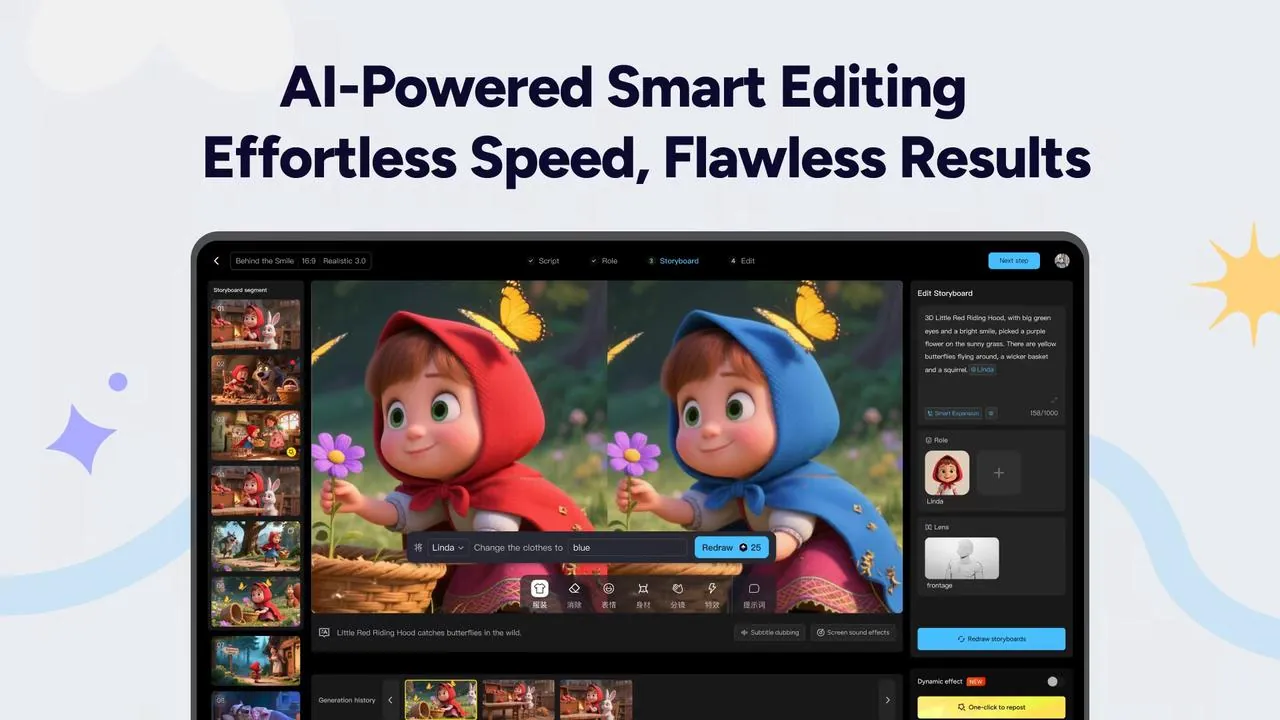
The storyboard editor. Each step (Script → Role → Storyboard → Edit) is a tab at the top, and one text prompt recolours the hood without redrawing the character. Image: MagicLight.AI - Add voice, music & subtitlesChoose a narrator voice, set the music mood, and switch on subtitles for silent-scrolling viewers.
- Generate & exportRender the video, preview it, and download it ready to upload. MagicLight even drafts a title, summary and hashtags for you, and you can download the scene images separately.
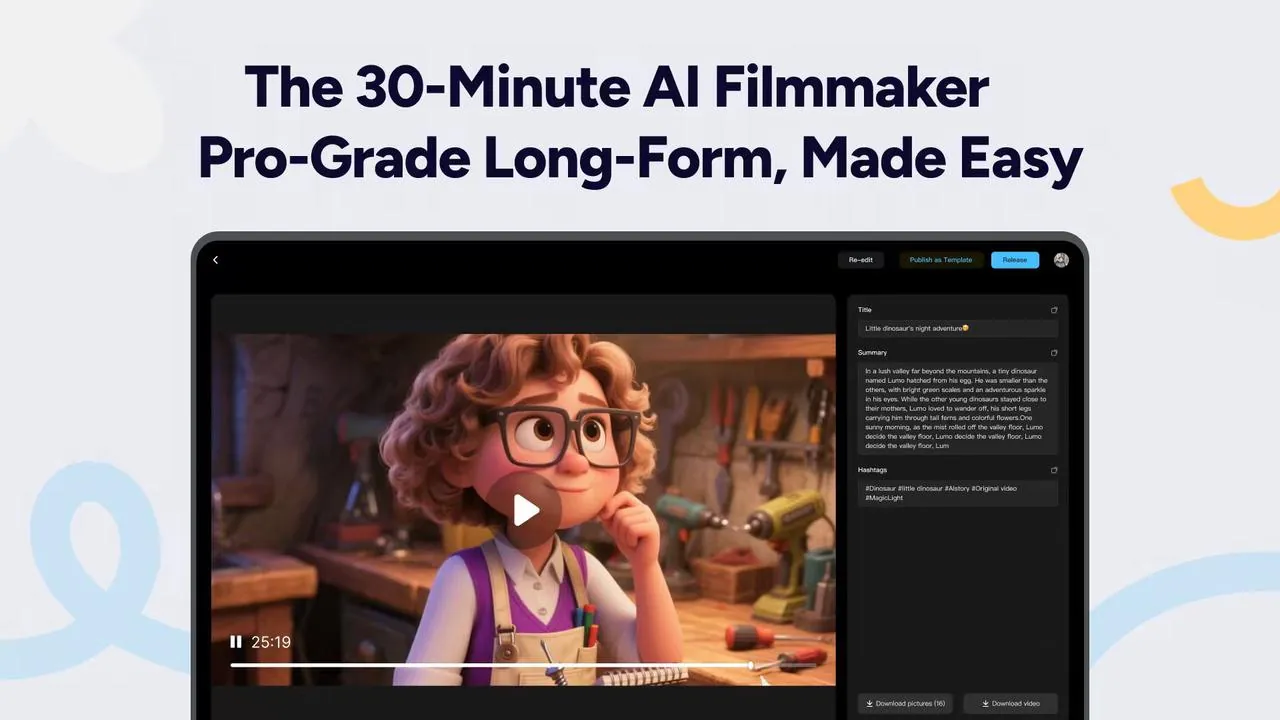
The export screen for a finished 25-minute film, with an auto-written title, summary and hashtags. Image: MagicLight.AI
Expect some waiting. Long videos take time to render. Start with a 1–3 minute test to learn the workflow and conserve credits before tackling a 20-minute epic.
Creative ways to use MagicLight
Bedtime-story channel
A calm narrator, soft watercolour style and a recurring character kids love — one of the most popular faceless YouTube niches.
History explained
Bring historical events to life with cinematic scenes and a documentary-style voiceover.
Animated lessons
Turn a dry topic — photosynthesis, fractions, the water cycle — into a story students actually remember.
Book trailers
Authors can create an animated trailer for a new release, with characters matching their descriptions.
Brand storytelling
Explain your product through a customer's journey instead of another talking-head video.
Short-form series
Split one long story into a cliffhanger series of vertical Shorts to keep viewers coming back.
Multilingual versions
Re-voice the same video in other languages to reach new audiences with the same visuals.
Family keepsakes
Turn grandparents' stories or your kid's made-up tales into a cartoon the family will treasure.
Tips for better results
- Describe characters precisely. "A 10-year-old girl with curly red hair, green raincoat and yellow boots" beats "a girl".
- One action per scene. Simple, visual scene descriptions produce cleaner images than crowded ones.
- Hook in the first 10 seconds. Open with a question or a dramatic moment — retention matters more than length.
- Test short, then scale. Perfect your style and characters on a short piece before committing credits to a long video.
- Save your cast. Reuse the same characters across episodes to build a recognisable series.
- Add a human touch. Original scripts, your own editing and genuine storytelling help videos stand out — and stay in line with platform monetisation policies.
Write a 3-minute children's bedtime story about [character] who [goal].
Format it as 10 numbered scenes. For each scene give:
- Narration (2–3 gentle sentences)
- Visual: one simple line describing what we see
Before scene 1, describe each character's appearance in one detailed sentence.
Want to turn this into a channel? Our guide The one-person AI studio shows how to pair MagicLight with Claude and ElevenLabs, and the YouTube rules that decide if AI videos get paid.
Plans & pricing
MagicLight uses a credit system: generating images, animation and audio consumes credits, and longer or higher-quality videos use more. There's a free plan to try it, and annual billing is much cheaper than monthly.
Free
Starter credits to test the full workflow. Watermarks and limits apply.
Standard
About $12 billed monthly, ~6,000 credits/month. Great for regular short videos.
Pro
More credits for consistent weekly uploads and longer videos.
Ultra
For high-volume creators and multiple channels.
Ultimate
Maximum credits for studios and agencies.
Promotional prices as reported mid-2026; MagicLight frequently runs discounts and adjusts plan names and credit allowances. Check the official pricing page for current offers.
Pros & cons
👍 What we love
- Genuinely long videos — up to 50 minutes
- Best-in-class character consistency
- All-in-one: visuals, voice, music, subtitles
- Huge style library
- Beginner-friendly guided workflow
- Affordable on annual plans
👎 What could be better
- Credits can go quickly on long, high-quality videos
- Some users report credits lost on failed generations
- Customer support can be slow to respond
- Motion is simpler than dedicated clip generators
- Long renders require patience
Frequently asked questions
Is MagicLight AI free?
There's a free plan with starter credits so you can try the whole workflow. For regular publishing, watermark-free exports and longer videos you'll want a paid plan.
How long can MagicLight videos be?
Story videos can run up to about 50 minutes — one of the longest of any AI video generator we've seen.
Can I monetise MagicLight videos on YouTube?
Paid plans generally include commercial use. YouTube rewards original, valuable content and requires disclosure of realistic synthetic media, so add your own scripts and storytelling. Always check the latest terms from both MagicLight and YouTube.
Do I need animation or editing skills?
No. The workflow is guided step by step. Editing skills help if you want to polish the result further in a separate editor.
How does it compare to other AI video tools?
Clip generators create short, cinematic shots you stitch together yourself. MagicLight focuses on complete, long narratives with consistent characters and audio — less raw motion realism, far more finished output.
Should you use MagicLight AI?
If you want to tell stories with video, absolutely. MagicLight is the most complete tool we've found for turning text into long-form animated video. Character consistency is excellent, the workflow is friendly, and it produces a finished product rather than raw clips.
Keep an eye on credit usage and start with short tests — but for YouTubers, educators and storytellers, MagicLight can replace hours of animation work with an afternoon.

I turned my 3 a.m. zoomies into a five-minute animated epic, and I looked the same in every scene. Nine lives, one consistent cat! Keep an eye on your credits for long videos, though.
Create your first story video free
Sign up, grab your free credits, and turn an idea into an animated video today.
Try MagicLight AIAlso read: ElevenLabs review (pro narration for your videos) · Higgsfield AI review (cinematic short clips and trailers) · Claude AI review · TradingView review · CustomGPT.ai review · Latest AI news